using GeoExplorer, OverpassAPI, GLMakie, Extents
fig = Figure(size=(800, 600))
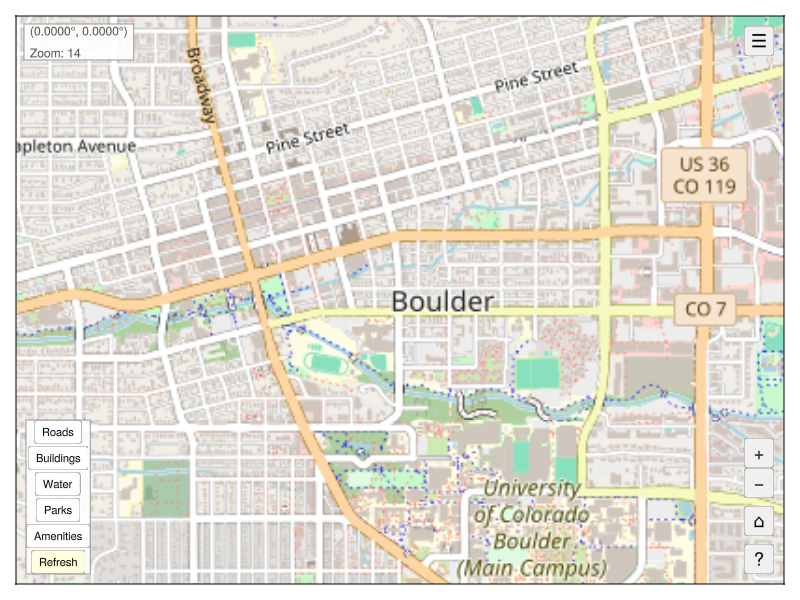
app = explore(extent=Extents.Extent(X=(-105.285, -105.26), Y=(40.005, 40.025)), figure=fig)
controls = add_overpass_controls!(app)
# Programmatically activate Roads, Buildings, and Parks
for name in ["Roads", "Buildings", "Parks"]
controls.buttons[name].clicks[] = 1
end
wait(app.map)
save("overpass_controls.png", fig)Overpass API Extension
The OverpassAPI extension adds toggle buttons to the map for fetching and displaying OpenStreetMap features (roads, buildings, parks, etc.) via the Overpass API.
Setup
The extension activates automatically when both GeoExplorer and OverpassAPI are loaded:
using Pkg
Pkg.add(url="https://github.com/RallypointOne/OverpassAPI.jl")
using GeoExplorer, OverpassAPIQuick Start
using GeoExplorer, OverpassAPI, Extents

# Launch map centered on Boulder, CO
app = explore(extent=Extents.Extent(X=(-105.30, -105.25), Y=(40.00, 40.03)))

# Add Overpass controls with default features
add_overpass_controls!(app)
This adds a panel of toggle buttons in the bottom-left corner of the map. Click a button to fetch and display that feature type for the visible map extent. Click again to hide it. Use Refresh to re-fetch active features after panning or zooming.
Default Features
| Button | Query | Plot Style |
|---|---|---|
| Roads | OQL.way["highway"] |
Gray lines |
| Buildings | OQL.way["building"] |
Orange polygons |
| Water | OQL.way["natural" => "water"] |
Blue polygons |
| Parks | OQL.way["leisure" => "park"] |
Green polygons |
| Amenities | OQL.node["amenity"] |
Red scatter |
Custom Features
Use OverpassFeature to define your own feature buttons:
using GeoExplorer, OverpassAPI, Extents
using OverpassAPI: OQL

app = explore(extent=Extents.Extent(X=(-105.30, -105.25), Y=(40.00, 40.03)))

add_overpass_controls!(app, features=[
    OverpassFeature("Roads",       OQL.way["highway"],                    :gray50,     :lines),
    OverpassFeature("Buildings",   OQL.way["building"],                   :orange,     :poly),
    OverpassFeature("Restaurants", OQL.node["amenity" => "restaurant"],   :red,        :scatter),
    OverpassFeature("Schools",     OQL.node["amenity" => "school"],       :purple,     :scatter),
])
OverpassFeature Fields
| Field | Type | Description |
|---|---|---|
name |
String |
Label for the toggle button |
query |
Any |
An OQL query expression |
color |
Any |
Any valid Makie color |
plot_type |
Symbol |
:lines, :poly, or :scatter |
Keyword Constructor
# Positional
OverpassFeature("Roads", OQL.way["highway"], :gray, :lines)

# Keyword (color and plot_type have defaults)
OverpassFeature("Roads", OQL.way["highway"]; color=:gray, plot_type=:lines)
Tips
- Zoom in before fetching — large extents can return a lot of data and slow down the Overpass API.
- Use Refresh after panning/zooming to update active layers for the new view.
- The
:polyplot type works best for closed ways (buildings, parks, water bodies). Use:linesfor open ways (roads, paths).